Getting locked out of a vault app is one of the most common complaints in vault reviews: in the most recent one- and two-star reviews of eight popular vault apps, which we read in October 2026, it came up 27 times. What you can do depends almost entirely on how the app was built, so this guide starts with what's safe to try, then explains each kind of recovery.
What should you not do when you forget a vault code?
- Don't delete or reinstall the app. The vault lives in the app's storage. Deleting the app deletes it.
- Don't guess wildly. Many vaults add delays after wrong tries, and some can wipe after too many. Try a few likely codes, then stop.
- Don't pay an unlock service. If the vault is properly encrypted, no outside tool can open it. If it isn't, the developer can help you directly.
- Don't restore an old iPhone backup over your phone hoping for an older code. You could lose newer photos and data.
What should you try first?
- Look for a "Forgot" option on the app's lock screen: forgot PIN, forgot password, use recovery phrase, or similar.
- Search your email for messages from the app: a recovery email, a setup confirmation, or a recovery code.
- Check where you keep passwords: Apple's Passwords app, a password manager, notes, or a paper note from when you set it up.
- Check other devices. If the vault is also on your iPad, it might still be unlocked there or use Face ID.
- Try Face ID or Touch ID if you turned it on. It may still open the vault even if you've forgotten the code.
- Contact the developer (App Store page › App Support). Give your app version and iPhone model. Never send them other passwords.
How does vault recovery work?
There are three models, and each trades convenience against privacy.
| Recovery model | How you get back in | The trade-off |
|---|---|---|
| Email or account reset | The developer emails you a reset or code | Easy to recover, but someone with your email, or the developer, can too |
| Recovery phrase or key you keep | Enter the phrase or key you saved at setup | Nobody else can reset it, so losing both the code and the phrase locks you out |
| No recovery | Only the code opens it | Maximum privacy, no second chance |
An app that can reset your code by email holds, or can rebuild, the key to your vault. That's not automatically bad, but it means your photos are only as private as your email account.
How do popular vault apps handle a forgotten code?
From each developer's own App Store listing or help pages (October 2026):
- PV – Secret Photo Album: set a recovery email in the app's settings; it's used if you forget the passcode.
- Keepsafe: account-based, tied to your email. Its help center covers losing access to that email (Keepsafe Help Center).
- Hide it Pro: lists a "Password Reset" in-app purchase for $4.99.
- Calculator#: its listing describes "Lost Password Recovery".
- Obscura: says plainly that if you forget your password, your photos are gone, with no reset or recovery email.
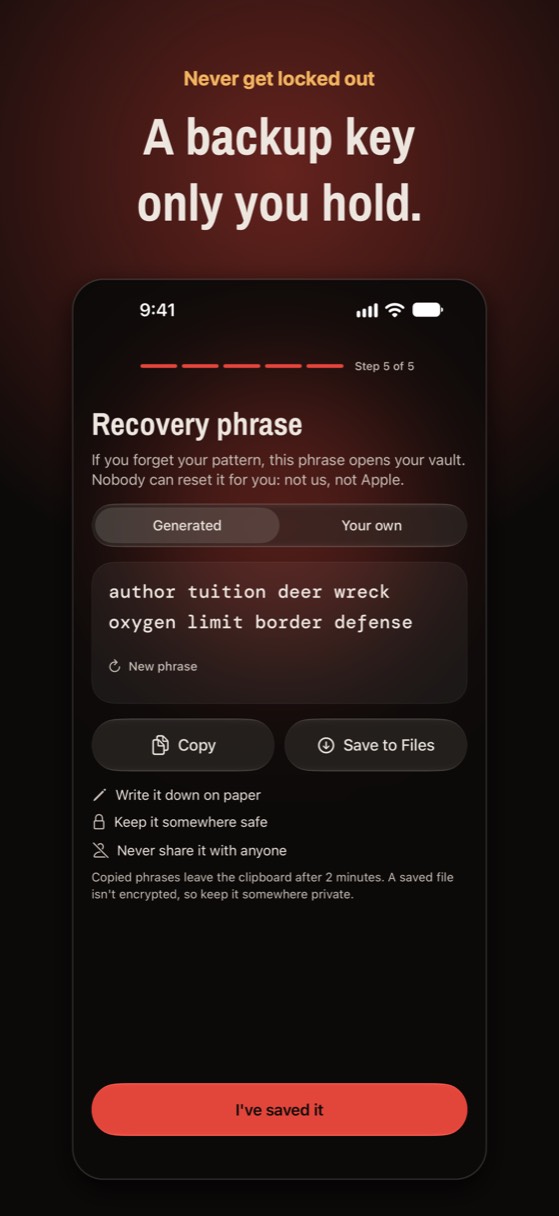
- Noxium (which we make): no reset by anyone, including us or Apple. At setup you write down a recovery phrase; on the lock screen, tap "Use recovery phrase" and it opens your main vault.
Try Noxium free: join the beta →
What if you forgot your iPhone passcode (Hidden album)?
Apple's Hidden album opens with Face ID or your iPhone passcode. If Face ID still works, it still opens. If you changed your passcode in the last 72 hours, iOS 17 and later let you use the previous one from the lock screen's "Forgot Passcode?" option.
Otherwise, the only way back is to erase the iPhone with a computer or in Recovery Mode, then restore from a backup (Apple: reset your iPhone and passcode). Photos in iCloud Photos come back when you sign in again; anything that was only on the phone and not in a backup is lost.
How do you avoid getting locked out next time?
- Save the code in Apple's Passwords app or a password manager, with a note of which app it's for.
- Set up recovery now, whatever your app offers, and test it once.
- Write a recovery phrase on paper and keep it somewhere safe, away from the phone.
- Keep a backup you understand, so a lockout isn't also a loss. See what to do if a vault loses photos.
Never locked out, never reset by anyone else
Noxium has you write down a recovery phrase at setup. It opens your vault if you forget your pattern, and nobody else, including us, can reset it.
Join the beta Version 1.0 was submitted to App Store review in October 2026. It is not on the App Store yet.Questions people ask
Can a photo vault app reset my password?
Only if it was built that way, usually through your email or an account. Vaults that encrypt with a key only you hold can't reset it; they rely on a recovery phrase or key you saved.
Can I recover a vault if I deleted the app?
Only from a backup: the app's cloud, your iCloud, or a computer copy. Deleting the app deletes the vault stored on the phone.
Is there software that can unlock a photo vault?
Not for a properly encrypted vault. Treat any paid unlock tool or service as a scam, and contact the app's developer instead.
What if I forgot my Noxium pattern?
Tap "Use recovery phrase" on the lock screen and enter the phrase you wrote down at setup. If you've lost both, nobody can open the vault, including us.
Something wrong or out of date? Email business@inertiaprojects.info and we'll fix it.