There's no "lock this album" button in the Photos app. Instead, iOS 26 gives you a few locks that work at different levels: one album, the whole app, or a single note. Here's how to set up each one, what it actually locks, and when you need something stronger.
How do you lock photos in the Hidden album with Face ID?
Hide the photos, then make sure the Hidden album's Face ID lock is on. It's on by default since iOS 16.
- Hide the photos: in Photos, touch and hold a photo and tap Hide. For several, tap Select, choose them, tap More (…) and Hide.
- Check the lock: go to Settings › Apps › Photos and turn on Use Face ID (or Use Touch ID / Use Passcode). This locks both Hidden and Recently Deleted.
- Optional: turn off Show Hidden Album so the album doesn't appear in Collections at all.
Photos can't lock other albums. Only Hidden and Recently Deleted have a lock. And the lock accepts your iPhone passcode, so anyone who knows it can open the album (Apple Support).
How do you lock the whole Photos app?
Since iOS 18, you can make any app ask for Face ID before it opens.
- Touch and hold the Photos icon on the Home Screen.
- Tap Require Face ID and confirm.
Now Photos asks for Face ID every time it opens, which stops someone you've handed your unlocked phone from browsing your library. It's all or nothing, though: you'll unlock your whole library many times a day, and the passcode still opens it.
How do you lock photos in a note?
Add photos to a note, then lock the note. Notes can use a separate password from your iPhone passcode, with Face ID as a shortcut.
- In Notes, create a note, tap the camera button and choose Choose Photo or Video.
- Tap More (…) and Lock.
- To use a separate password, go to Settings › Apps › Notes › Password, choose a Notes password, and turn on Use Face ID.
- Delete the originals from Photos, then from Recently Deleted.
This is the only built-in lock that can be separate from your passcode. It suits a handful of photos, not a library: there are no albums, and long videos are awkward. If you forget a separate Notes password, Apple can't recover the locked notes.
How do you show someone one photo without them swiping?
Use Guided Access. It locks the iPhone to the app you're in, so the other person can't leave it.
- Turn it on once in Settings › Accessibility › Guided Access, and set a passcode.
- Open the photo, then triple-click the side button and tap Start. You can circle areas of the screen to disable them.
- To end it, triple-click the side button and enter the Guided Access passcode.
Guided Access doesn't stop swiping between photos inside Photos unless you disable touch on the screen, so circle the whole photo or turn off Touch in its options.
Can you lock photos with a pattern on iPhone?
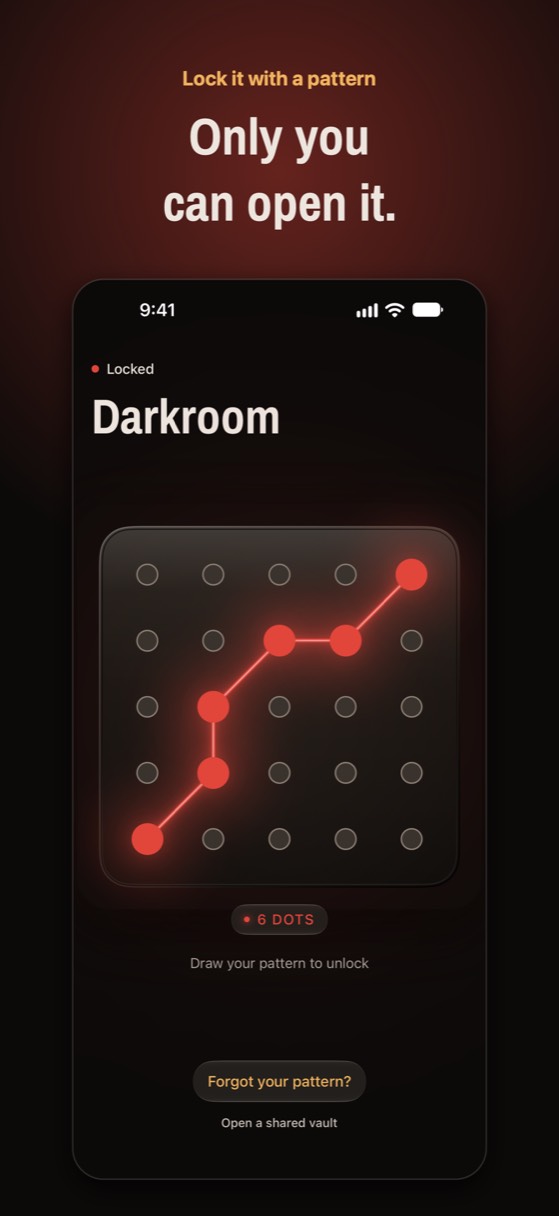
Not with built-in features. iOS uses Face ID, Touch ID and passcodes; a drawn pattern lock comes only from vault apps. Private Photo Vault, Vaultaire and Noxium, among others, offer a pattern according to their App Store listings and websites.
A pattern is only as good as what's behind it. In some apps it just opens a screen in front of normal files; in others it's used to derive the encryption key. Ask how the app uses it before you trust it (we explain the difference in how encrypted photo vaults work).
In Noxium, which we make, you draw a pattern across at least 6 of the 25 bolts on a 5×5 plate. The pattern is never stored: it's stretched with Argon2id into the key that opens your vault, and every photo is encrypted on the iPhone with AES-256-GCM. Face ID can open the main vault for convenience, but never a decoy vault.
Try Noxium free: join the beta →
Which photo lock should you use?
| Lock | What it locks | Separate from passcode? | Good for |
|---|---|---|---|
| Hidden album lock | Hidden and Recently Deleted | No | Keeping photos out of your library |
| Require Face ID on Photos | The whole Photos app | No | Handing your phone to someone |
| Locked note | One note | Yes, with a Notes password | A few photos |
| Guided Access | The screen you're on | Yes | Showing a single photo |
| Vault app with its own code | The vault's photos and videos | Yes | Photos that must stay private from anyone |
A lock that isn't your passcode
Noxium opens with a pattern only you know, separate from your iPhone passcode. Every photo is encrypted on your iPhone. Free for 150 photos and 10 videos.
Join the beta Version 1.0 was submitted to App Store review in October 2026. It is not on the App Store yet.Questions people ask
Can I lock a specific album on iPhone?
No. The Photos app only locks the Hidden and Recently Deleted albums. To lock other photos, hide them, put them in a locked note, or use a vault app.
Can I lock photos with a different password than my iPhone passcode?
Yes, in two ways: a locked note with a separate Notes password, or a vault app with its own PIN, password or pattern.
Does locking the Photos app hide it?
No. Require Face ID only asks for Face ID when Photos opens. The app stays on your Home Screen.
Is a pattern lock safer than a PIN?
Not automatically. What matters is whether the code is used to encrypt the photos and how slow it is to guess. A long pattern or password used to derive an encryption key is far stronger than a 4-digit PIN in front of normal files.
Something wrong or out of date? Email business@inertiaprojects.info and we'll fix it.