A vault that can be reset by email is a vault someone else can open. A vault with no way back punishes one bad day of memory. Noxium, the photo vault we make, sits in between: there is no reset, but there is a spare key that only you hold. This page explains how the recovery phrase works, how to make and store it, and what happens if you lose it.
How does the recovery phrase work?
The phrase is a second way to make the key that opens your vault. Your pattern and your phrase each seal the same vault key, so either one opens it.
- A generated phrase is 8 words. Noxium picks them at random from the 2,048-word BIP-39 English list, the same list many crypto wallets use. That's 88 bits of randomness, far more than any pattern.
- It becomes a key the same way your pattern does. Argon2id (libsodium) stretches it, with 64 MiB of memory and 3 passes, into a key that seals your vault key with AES-256-GCM.
- It is never stored. Like your pattern, the phrase isn't kept anywhere by Noxium. Only the sealed vault key is, on your iPhone and in your encrypted iCloud backup.
- Case and spacing don't matter. "Author Tuition" and "author tuition" are read the same, so a phrase copied from paper still works.
Because the phrase opens the vault key itself, it works without the old phone, and without us. For how keys inside keys work, see how encrypted photo vaults work.
How do you set it up?
The phrase is the last step of setup, and you can replace it any time.
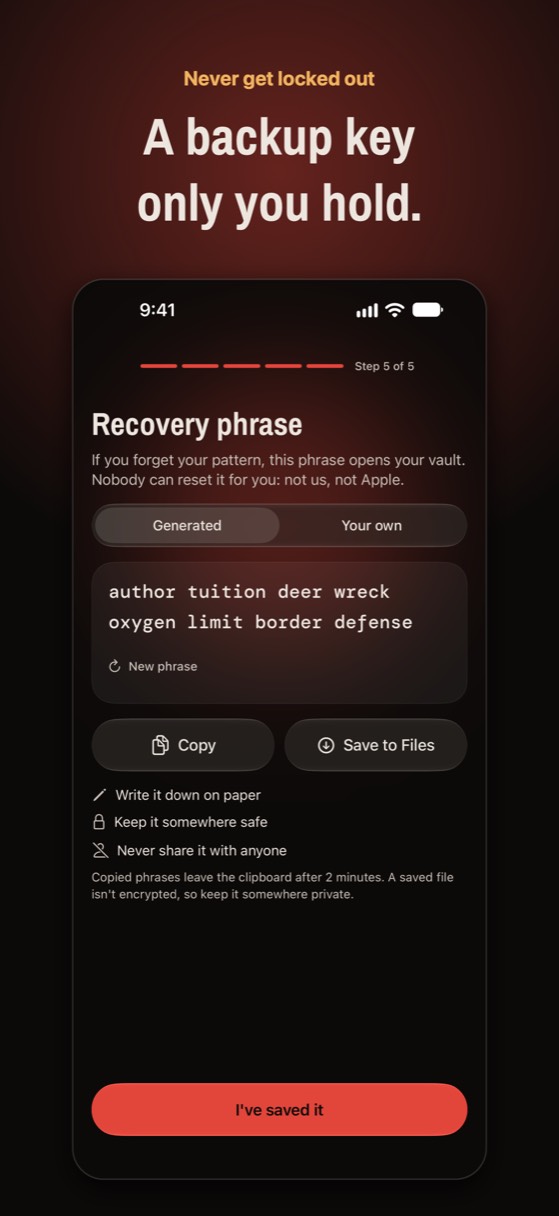
- Get your phrase. On Recovery phrase, keep Generated to use 8 random words. Tap New phrase if you'd like different ones.
- Or choose your own. Tap Your own and type 6 to 9 words, at least 20 characters in all. A phrase you make up is easier to remember and easier to guess, so avoid song lyrics and quotes.
- Write it down on paper. Copy and Save to Files exist, but a copied phrase leaves the clipboard after 2 minutes and a saved file isn't encrypted.
- Pass the quick check. Tap I've saved it. For a generated phrase, Noxium asks for a word or two, such as "Which is word 3 of your phrase?", so you know your copy is right.
- Replace it later. Inside the vault, open Settings › Recovery phrase and tap Make a new recovery phrase or Choose my own phrase. The new phrase replaces the old one, which stops working.
How do you use it if you forget your pattern?
Tap Forgot your pattern? on the lock screen and type the phrase. It opens your main vault.
- On the same iPhone: on the lock screen, tap Forgot your pattern?, enter the phrase in Use your recovery phrase, and the main vault opens.
- Set a new pattern: once you're in, go to Settings › Change pattern.
- On a new iPhone: sign in to the same Apple Account, open Noxium, and on Restore your vault choose Restore with recovery phrase.
Locked out of a different app? Our guide on what to do if you forgot your photo vault password covers how other vaults handle it.
Where should you keep it?
On paper, somewhere safe, away from the phone. Some practical choices:
- A place you'd keep a passport. A drawer or a document folder at home, not your wallet or phone case.
- A password manager, if you already use one well. It's encrypted and backed up. Don't put it in a plain note, an email to yourself, or a photo.
- Not inside the vault. The phrase is for when you can't get in.
- Never share it. Anyone with the phrase can open your main vault without your pattern.
What doesn't the recovery phrase protect?
- Losing both. If you forget your pattern and lose the phrase, nobody can open the vault: not us, not Apple. That's the cost of a vault no one else can open.
- A phrase someone finds. A phrase on paper is only as safe as where you keep it. If you think someone saw it, make a new one.
- Other vaults. The phrase from setup opens your main vault only. A decoy vault opens with its own pattern, or with a phrase you make for it in that vault's Settings.
- A deleted app with no backup. The phrase opens a vault that still exists, on the phone or in iCloud. If the app is deleted and there's no backup, there's nothing left to open.
Is it free or Pro?
The recovery phrase is part of every Noxium vault, free and Pro. The free plan includes 150 photos, 10 videos, unlimited notes, 1 decoy vault, and full iCloud backup and restore.
Never locked out, never reset by anyone else
You write down a recovery phrase at setup, and it opens your vault. Nobody can reset a pattern: not the developer, not Apple.
Download on the App Store Available on the App Store for iPhone and iPad.Questions people ask
What is a recovery phrase in a photo vault?
A set of words you save at setup that can open the vault if you forget your code. Unlike an email reset, only the person holding the words can use it.
Can I see my recovery phrase again later?
No. Noxium doesn't store it, so it can't show it again. If you've lost your copy, make a new one in Settings › Recovery phrase while you can still open the vault.
Does changing my pattern change the phrase?
No. The pattern and the phrase are two separate keys to the same vault. Changing one leaves the other working.
Is it the same as a crypto wallet seed phrase?
It uses the same BIP-39 word list, but it isn't a wallet seed and can't be used for one. Treat it with the same care.
Can Noxium's developer recover my vault?
No. We never have your pattern, your phrase or your keys. That's why the phrase matters.
Something wrong or out of date? Email business@inertiaprojects.info and we'll fix it.