Most photo vault apps ask for a 4-digit PIN. That's 10,000 codes, and people pick birthdays and years. Noxium, the photo vault we make, uses a pattern on a larger grid instead. It is quick to draw with one thumb, hard to guess, and it is the only thing that can unlock your vault. This page explains how the pattern lock works, how to pick a strong one, and what it can't do.
How does the pattern lock work?
Your pattern is turned into an encryption key on the iPhone, and that key unlocks the vault. Nothing compares your pattern to a saved copy, because there is no saved copy.
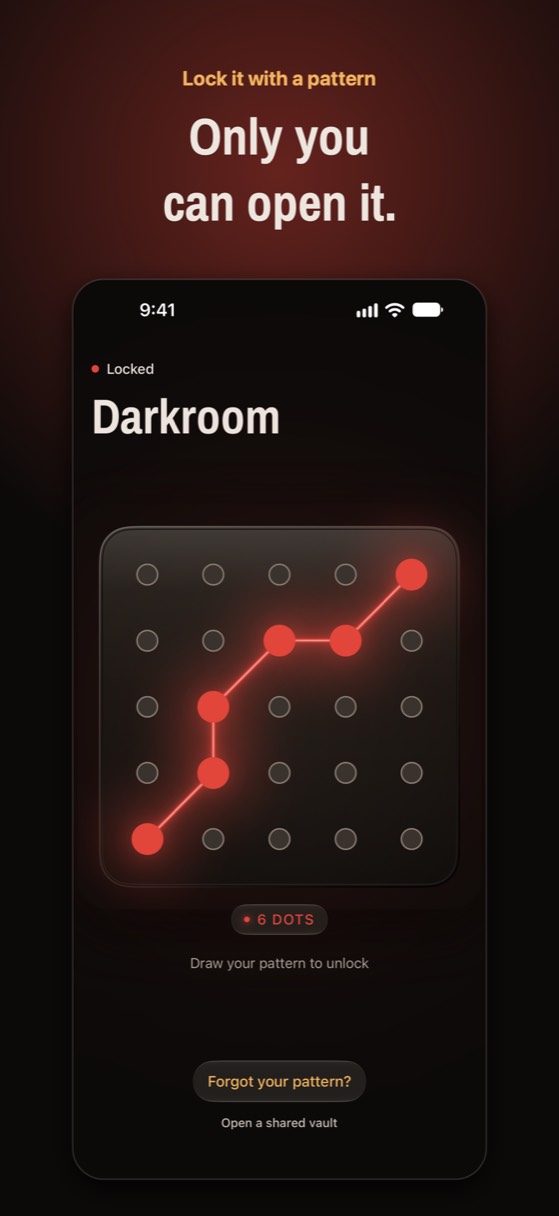
- You draw. The plate has 25 bolts in 5 rows of 5. A pattern must touch at least 6 of them. If your line passes straight over a bolt you haven't used yet, that bolt is added for you, as on Android pattern locks.
- The pattern becomes a key. Noxium runs the pattern through Argon2id (from libsodium) with 64 MiB of memory and 3 passes. This is slow on purpose, so every guess costs time and memory.
- The key opens the vault key. Each vault has its own random key, sealed with the pattern key using AES-256-GCM. If the seal opens, you're in. If it doesn't, nothing opens and nothing is shown.
Because the check is "does this key open a vault?", one lock screen can serve several vaults. A decoy vault simply has its own pattern. Noxium tries every vault each time, so a wrong pattern looks the same however many vaults exist. For the cryptography in plain English, see how encrypted photo vaults work and our page on on-device encryption.
How many patterns are there?
On Noxium's 5×5 plate there are 19,174,112 different patterns that touch exactly 6 bolts. We counted them with the same drawing rules the app uses. Longer patterns add far more:
| Lock | Possible codes |
|---|---|
| 4-digit PIN | 10,000 |
| 6-digit PIN | 1,000,000 |
| Android 3×3 pattern (4 to 9 dots) | 389,112 |
| Noxium 5×5, exactly 6 bolts | 19,174,112 |
| Noxium 5×5, exactly 7 bolts | 261,248,096 |
| Noxium 5×5, exactly 8 bolts | 3,428,210,784 |
These are counts of what's possible, not what people choose. Studies of Android pattern locks found that most people draw short shapes that start in a corner and move left to right and top to bottom. A shape like that is guessed long before the big numbers matter. The count only protects you if your pattern isn't an obvious one.
How do you pick a strong pattern?
Use more than 6 bolts, change direction, and avoid letters and simple shapes. A few rules of thumb:
- Go to 8 or more bolts. Each extra bolt multiplies the number of possible patterns by roughly 13.
- Don't start in a corner. The top-left corner is the most common start on any pattern lock.
- Cross your own line. Diagonals and knight-like jumps (two across, one down) are rarer than straight runs.
- Skip letters, initials and outlines. An L, a Z, a square or your initial are the first things someone tries.
- Make it different from your iPhone passcode and any decoy pattern. Noxium refuses a pattern that already opens another vault.
How do you set it up?
You draw your pattern the first time you open Noxium, and you can change it any time from inside the vault.
- Draw your pattern. On Set your pattern, draw across at least 6 bolts. If you use fewer, Noxium tells you how many you drew.
- Draw it again. Step 2 of 2 asks for the same pattern. If the two don't match, you start over.
- Save your recovery phrase. Setup ends with a recovery phrase, the spare key if you forget your pattern.
- Change it later. Open the vault, tap Settings › Change pattern, and draw the new one. Only the vault key's seal changes; your photos aren't re-encrypted.
How does Face ID fit in?
Face ID is a shortcut to the main vault, not a replacement for the pattern. When you turn it on in Settings › Lock, Noxium keeps the main vault's key in the iPhone's Keychain, locked to Face ID on this device only. It never syncs to iCloud. If someone adds a new face to your iPhone, the saved key stops working and you draw your pattern again. Decoy vaults never use Face ID: they open only with their own patterns. To lock other apps and the Photos app with Face ID, see how to lock photos on iPhone.
What doesn't the pattern lock protect?
A pattern is only as private as the moment you draw it. Be honest with yourself about these limits:
- Someone watching. Patterns are easier to see over a shoulder than a PIN. Draw it with the screen angled away, or use Face ID in public.
- Smudges. A greasy screen can show the path of a pattern you draw often. Wipe the screen now and then.
- A short or obvious pattern. The 19 million figure means nothing if your pattern is a Z.
- Being forced to open it. No lock stops someone who makes you draw it. That's what a decoy vault is for.
- An unlocked phone left open. While the vault is open, anyone holding the phone can see it. Set Settings › Lock after leaving to Immediately.
Wrong guesses are slowed down too. After 5 wrong patterns Noxium waits 30 seconds before the next try, after 10 it waits 5 minutes, and after 15 it waits 30 minutes.
Is it free or Pro?
The pattern lock is part of every Noxium vault, free and Pro. The free plan includes 150 photos, 10 videos, unlimited notes, 1 decoy vault, and full iCloud backup and restore. Noxium Pro adds unlimited items and album patterns, which put a separate pattern on a single album.
A lock that is also the key
Your pattern is never stored. It is stretched with Argon2id into the key that opens your vault.
Download on the App Store Available on the App Store for iPhone and iPad.Questions people ask
Is a pattern lock safer than a PIN?
It can be. A 6-bolt pattern on Noxium's 5×5 plate has about 19 million possibilities, against 10,000 for a 4-digit PIN. But people pick predictable patterns, so a long, irregular pattern is what makes it safer.
Is my pattern stored on the phone?
No. Noxium keeps only the vault key sealed with a key made from your pattern. When you draw, it rebuilds that key and tries to open the seal.
What happens if I draw the wrong pattern?
Nothing opens. After 5 wrong tries Noxium makes you wait 30 seconds, then 5 minutes after 10, and 30 minutes after 15.
What if I forget my pattern?
Tap Forgot your pattern? on the lock screen and enter your recovery phrase. Nobody can reset a pattern: not us, not Apple. More in forgot your photo vault password.
Can I use the same pattern on a new iPhone?
Yes. On a new iPhone signed in to the same Apple Account, choose Restore your vault and draw the same pattern. Face ID has to be turned on again there.
Something wrong or out of date? Email business@inertiaprojects.info and we'll fix it.